Showing posts with label python3. Show all posts

Sunday, 23 April 2017

Kafka using Python

Python client for the Apache Kafka distributed stream processing system. kafka-python is designed to function much like the official java client, with a sprinkling of pythonic interfaces (e.g., consumer iterators).
kafka-python is best used with newer brokers (0.10 or 0.9), but is backwards-compatible with older versions (to 0.8.0). Some features will only be enabled on newer brokers, however; for example, fully coordinated consumer groups – i.e., dynamic partition assignment to multiple consumers in the same group – requires use of 0.9+ kafka brokers. Supporting this feature for earlier broker releases would require writing and maintaining custom leadership election and membership / health check code (perhaps using zookeeper or consul). For older brokers, you can achieve something similar by manually assigning different partitions to each consumer instance with config management tools like chef, ansible, etc. This approach will work fine, though it does not support rebalancing on failures.
Please note that the master branch may contain unreleased features. For release documentation, please see readthedocs and/or python’s inline help.
>>> pip install kafka-python

KafkaConsumer

KafkaConsumer is a high-level message consumer, intended to operate as similarly as possible to the official java client. Full support for coordinated consumer groups requires use of kafka brokers that support the Group APIs: kafka v0.9+.
The consumer iterator returns ConsumerRecords, which are simple namedtuples that expose basic message attributes: topic, partition, offset, key, and value:
>>> from kafka import KafkaConsumer
>>> consumer = KafkaConsumer('my_favorite_topic')
>>> for msg in consumer:
...     print (msg)
>>> # join a consumer group for dynamic partition assignment and offset commits
>>> from kafka import KafkaConsumer
>>> consumer = KafkaConsumer('my_favorite_topic', group_id='my_favorite_group')
>>> for msg in consumer:
...     print (msg)
>>> # manually assign the partition list for the consumer
>>> from kafka import TopicPartition
>>> consumer = KafkaConsumer(bootstrap_servers='localhost:1234')
>>> consumer.assign([TopicPartition('foobar', 2)])
>>> msg = next(consumer)
>>> # Deserialize msgpack-encoded values
>>> consumer = KafkaConsumer(value_deserializer=msgpack.loads)
>>> consumer.subscribe(['msgpackfoo'])
>>> for msg in consumer:
...     assert isinstance(msg.value, dict)

KafkaProducer

KafkaProducer is a high-level, asynchronous message producer. The class is intended to operate as similarly as possible to the official java client
>>> from kafka import KafkaProducer
>>> producer = KafkaProducer(bootstrap_servers='localhost:1234')
>>> for _ in range(100):
...     producer.send('foobar', b'some_message_bytes')
>>> # Block until a single message is sent (or timeout)
>>> future = producer.send('foobar', b'another_message')
>>> result = future.get(timeout=60)
>>> # Block until all pending messages are at least put on the network
>>> # NOTE: This does not guarantee delivery or success! It is really
>>> # only useful if you configure internal batching using linger_ms
>>> producer.flush()
>>> # Use a key for hashed-partitioning
>>> producer.send('foobar', key=b'foo', value=b'bar')
>>> # Serialize json messages
>>> import json
>>> producer = KafkaProducer(value_serializer=lambda v: json.dumps(v).encode('utf-8'))
>>> producer.send('fizzbuzz', {'foo': 'bar'})
>>> # Serialize string keys
>>> producer = KafkaProducer(key_serializer=str.encode)
>>> producer.send('flipflap', key='ping', value=b'1234')
>>> # Compress messages
>>> producer = KafkaProducer(compression_type='gzip')
>>> for i in range(1000):
...     producer.send('foobar', b'msg %d' % i)

Compression

kafka-python supports gzip compression/decompression natively. To produce or consume lz4 compressed messages, you must install lz4tools and xxhash (modules may not work on python2.6). To enable snappy compression/decompression install python-snappy (also requires snappy library).

Protocol

A secondary goal of kafka-python is to provide an easy-to-use protocol layer for interacting with kafka brokers via the python repl. This is useful for testing, probing, and general experimentation. The protocol support is leveraged to enable a KafkaClient.check_version() method that probes a kafka broker and attempts to identify which version it is running (0.8.0 to 0.10).

Usage

SimpleProducer

from kafka import SimpleProducer, KafkaClient

# To send messages synchronously
kafka = KafkaClient('localhost:9092')
producer = SimpleProducer(kafka)

# Note that the application is responsible for encoding messages to type bytes
producer.send_messages(b'my-topic', b'some message')
producer.send_messages(b'my-topic', b'this method', b'is variadic')

# Send unicode message
producer.send_messages(b'my-topic', u'你怎么样?'.encode('utf-8'))

Asynchronous Mode

# To send messages asynchronously
producer = SimpleProducer(kafka, async=True)
producer.send_messages(b'my-topic', b'async message')

# To wait for acknowledgements
# ACK_AFTER_LOCAL_WRITE : server will wait till the data is written to
#                         a local log before sending response
# ACK_AFTER_CLUSTER_COMMIT : server will block until the message is committed
#                            by all in sync replicas before sending a response
producer = SimpleProducer(kafka, async=False,
                          req_acks=SimpleProducer.ACK_AFTER_LOCAL_WRITE,
                          ack_timeout=2000,
                          sync_fail_on_error=False)

responses = producer.send_messages(b'my-topic', b'another message')
for r in responses:
    logging.info(r.offset)

# To send messages in batch. You can use any of the available
# producers for doing this. The following producer will collect
# messages in batch and send them to Kafka after 20 messages are
# collected or every 60 seconds
# Notes:
# * If the producer dies before the messages are sent, there will be losses
# * Call producer.stop() to send the messages and cleanup
producer = SimpleProducer(kafka, async=True,
                          batch_send_every_n=20,
                          batch_send_every_t=60)

Keyed messages

from kafka import (
    KafkaClient, KeyedProducer,
    Murmur2Partitioner, RoundRobinPartitioner)

kafka = KafkaClient('localhost:9092')

# HashedPartitioner is default (currently uses python hash())
producer = KeyedProducer(kafka)
producer.send_messages(b'my-topic', b'key1', b'some message')
producer.send_messages(b'my-topic', b'key2', b'this methode')

# Murmur2Partitioner attempts to mirror the java client hashing
producer = KeyedProducer(kafka, partitioner=Murmur2Partitioner)

# Or just produce round-robin (or just use SimpleProducer)
producer = KeyedProducer(kafka, partitioner=RoundRobinPartitioner)

KafkaConsumer

from kafka import KafkaConsumer

# To consume messages
consumer = KafkaConsumer('my-topic',
                         group_id='my_group',
                         bootstrap_servers=['localhost:9092'])
for message in consumer:
    # message value is raw byte string -- decode if necessary!
    # e.g., for unicode: `message.value.decode('utf-8')`
    print("%s:%d:%d: key=%s value=%s" % (message.topic, message.partition,
                                         message.offset, message.key,
                                         message.value))
messages (m) are namedtuples with attributes:
  • m.topic: topic name (str)
  • m.partition: partition number (int)
  • m.offset: message offset on topic-partition log (int)
  • m.key: key (bytes - can be None)
  • m.value: message (output of deserializer_class - default is raw bytes)
  from kafka import KafkaConsumer

  # more advanced consumer -- multiple topics w/ auto commit offset
  # management
  consumer = KafkaConsumer('topic1', 'topic2',
                           bootstrap_servers=['localhost:9092'],
                           group_id='my_consumer_group',
                           auto_commit_enable=True,
                           auto_commit_interval_ms=30 * 1000,
                           auto_offset_reset='smallest')

  # Infinite iteration
  for m in consumer:
    do_some_work(m)

    # Mark this message as fully consumed
    # so it can be included in the next commit
    #
    # **messages that are not marked w/ task_done currently do not commit!
    consumer.task_done(m)

  # If auto_commit_enable is False, remember to commit() periodically
  consumer.commit()

  # Batch process interface
  while True:
    for m in kafka.fetch_messages():
      process_message(m)
      consumer.task_done(m)


Configuration settings can be passed to constructor,
otherwise defaults will be used:
    client_id='kafka.consumer.kafka',
    group_id=None,
    fetch_message_max_bytes=1024*1024,
    fetch_min_bytes=1,
    fetch_wait_max_ms=100,
    refresh_leader_backoff_ms=200,
    bootstrap_servers=[],
    socket_timeout_ms=30*1000,
    auto_offset_reset='largest',
    deserializer_class=lambda msg: msg,
    auto_commit_enable=False,
    auto_commit_interval_ms=60 * 1000,
    consumer_timeout_ms=-1

Configuration parameters are described in more detail at
http://kafka.apache.org/documentation.html#highlevelconsumerapi

Multiprocess consumer

from kafka import KafkaClient, MultiProcessConsumer

kafka = KafkaClient('localhost:9092')

# This will split the number of partitions among two processes
consumer = MultiProcessConsumer(kafka, b'my-group', b'my-topic', num_procs=2)

# This will spawn processes such that each handles 2 partitions max
consumer = MultiProcessConsumer(kafka, b'my-group', b'my-topic',
                                partitions_per_proc=2)

for message in consumer:
    print(message)

for message in consumer.get_messages(count=5, block=True, timeout=4):
    print(message)

Low level

from kafka import KafkaClient, create_message
from kafka.protocol import KafkaProtocol
from kafka.common import ProduceRequest

kafka = KafkaClient('localhost:9092')

req = ProduceRequest(topic=b'my-topic', partition=1,
    messages=[create_message(b'some message')])
resps = kafka.send_produce_request(payloads=[req], fail_on_error=True)
kafka.close()

resps[0].topic      # b'my-topic'
resps[0].partition  # 1
resps[0].error      # 0 (hopefully)
resps[0].offset     # offset of the first message sent in this request
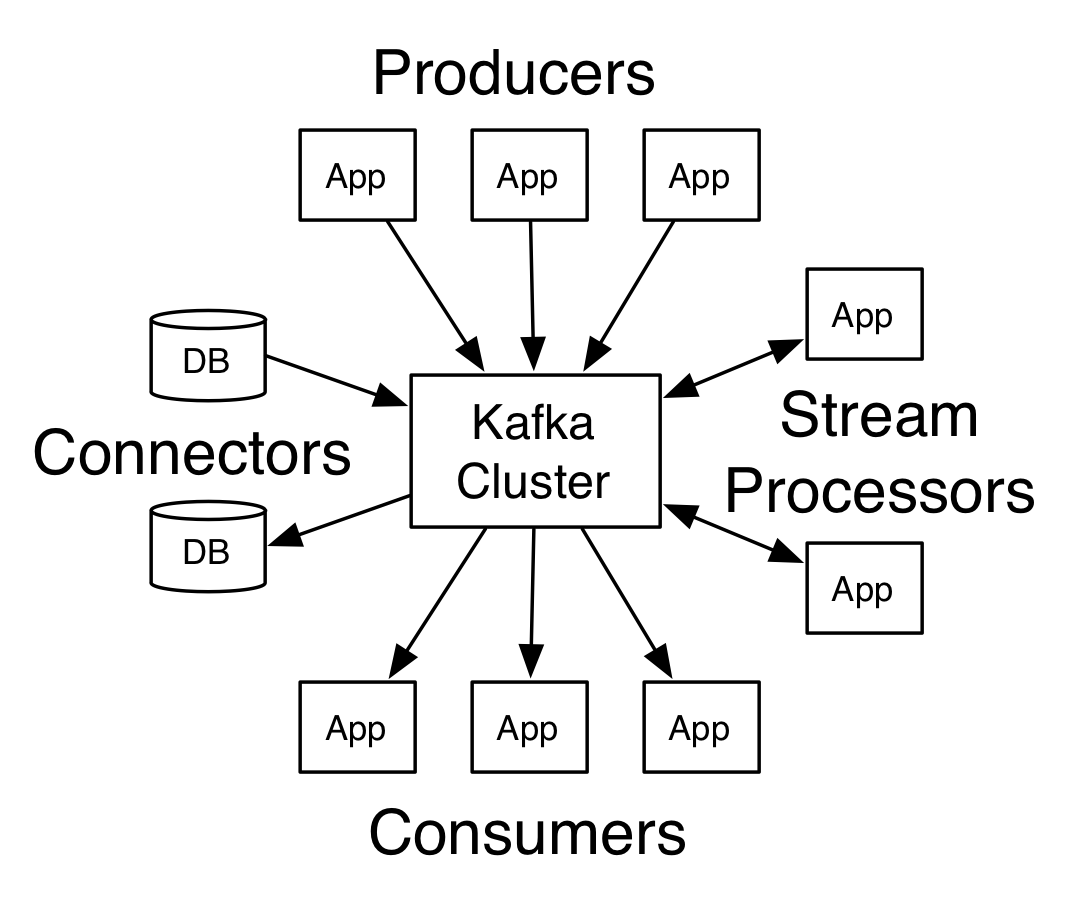
Intro to Kafka

18:16 Posted by SRE Hacks , , , , , , No comments

Introduction

Apache Kafk is a distributed streaming platform. What exactly does that mean?

We think of a streaming platform as having three key capabilities:
  1. It lets you publish and subscribe to streams of records. In this respect it is similar to a message queue or enterprise messaging system.
  2. It lets you store streams of records in a fault-tolerant way.
  3. It lets you process streams of records as they occur.
What is Kafka good for?
It gets used for two broad classes of application:
  1. Building real-time streaming data pipelines that reliably get data between systems or applications
  2. Building real-time streaming applications that transform or react to the streams of data
To understand how Kafka does these things, let's dive in and explore Kafka's capabilities from the bottom up.
First a few concepts:
  • Kafka is run as a cluster on one or more servers.
  • The Kafka cluster stores streams of records in categories called topics.
  • Each record consists of a key, a value, and a timestamp.
Kafka has four core APIs:
  • The Producer API allows an application to publish a stream of records to one or more Kafka topics.
  • The Consumer API allows an application to subscribe to one or more topics and process the stream of records produced to them.
  • The Streams API allows an application to act as a stream processor, consuming an input stream from one or more topics and producing an output stream to one or more output topics, effectively transforming the input streams to output streams.
  • The Connector API allows building and running reusable producers or consumers that connect Kafka topics to existing applications or data systems. For example, a connector to a relational database might capture every change to a table.
In Kafka the communication between the clients and the servers is done with a simple, high-performance, language agnostic TCP protocol. This protocol is versioned and maintains backwards compatibility with older version. We provide a Java client for Kafka, but clients are available in many languages.

Topics and Logs

Let's first dive into the core abstraction Kafka provides for a stream of records—the topic.
A topic is a category or feed name to which records are published. Topics in Kafka are always multi-subscriber; that is, a topic can have zero, one, or many consumers that subscribe to the data written to it.
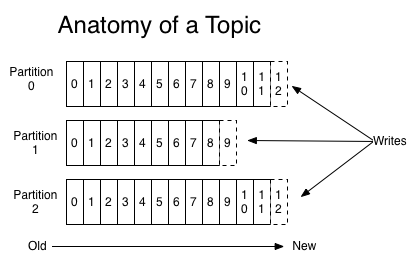
For each topic, the Kafka cluster maintains a partitioned log that looks like this:
Each partition is an ordered, immutable sequence of records that is continually appended to—a structured commit log. The records in the partitions are each assigned a sequential id number called the offset that uniquely identifies each record within the partition.
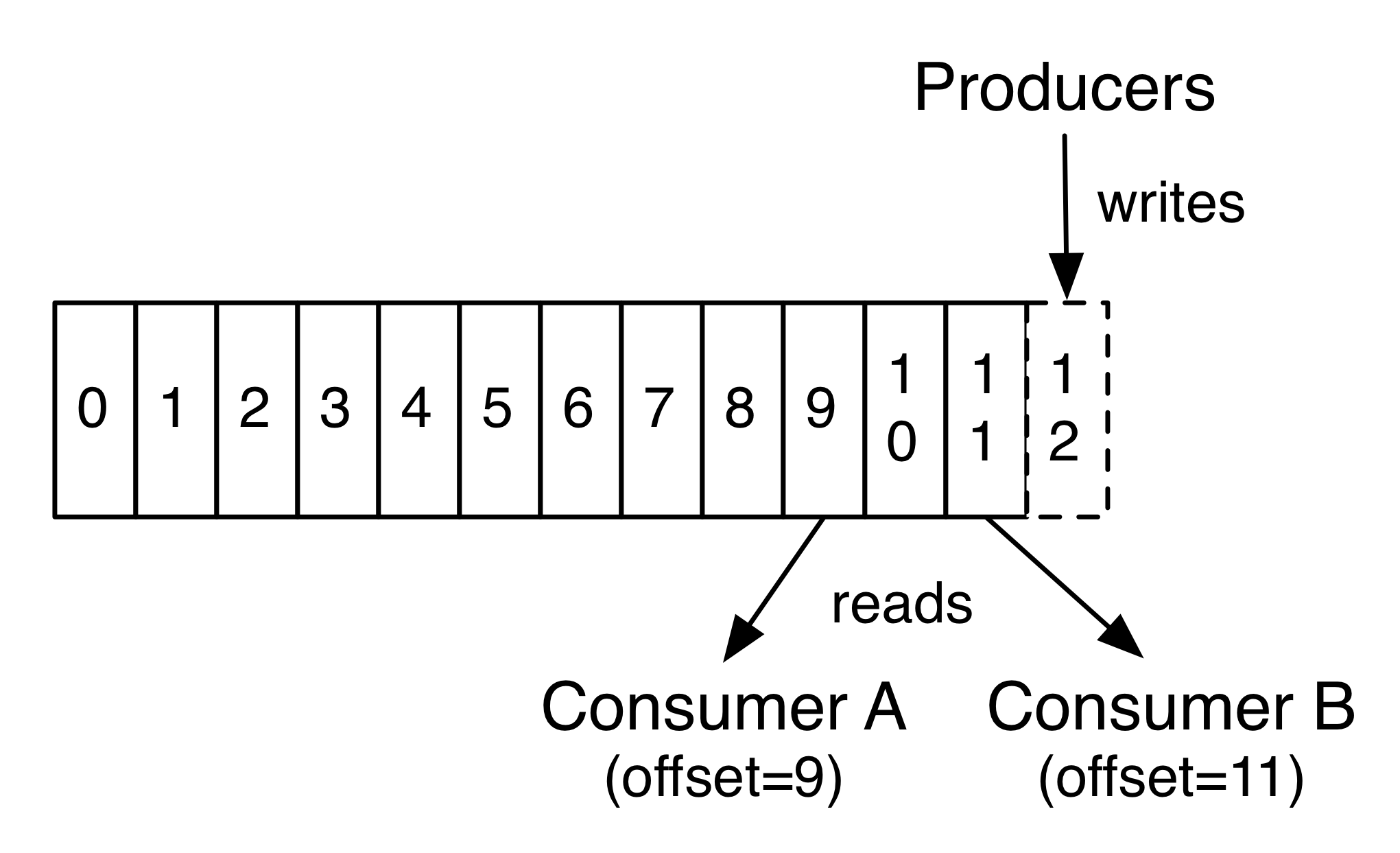
The Kafka cluster retains all published records—whether or not they have been consumed—using a configurable retention period. For example, if the retention policy is set to two days, then for the two days after a record is published, it is available for consumption, after which it will be discarded to free up space. Kafka's performance is effectively constant with respect to data size so storing data for a long time is not a problem.
In fact, the only metadata retained on a per-consumer basis is the offset or position of that consumer in the log. This offset is controlled by the consumer: normally a consumer will advance its offset linearly as it reads records, but, in fact, since the position is controlled by the consumer it can consume records in any order it likes. For example a consumer can reset to an older offset to reprocess data from the past or skip ahead to the most recent record and start consuming from "now".
This combination of features means that Kafka consumers are very cheap—they can come and go without much impact on the cluster or on other consumers. For example, you can use our command line tools to "tail" the contents of any topic without changing what is consumed by any existing consumers.
The partitions in the log serve several purposes. First, they allow the log to scale beyond a size that will fit on a single server. Each individual partition must fit on the servers that host it, but a topic may have many partitions so it can handle an arbitrary amount of data. Second they act as the unit of parallelism—more on that in a bit.

Distribution

The partitions of the log are distributed over the servers in the Kafka cluster with each server handling data and requests for a share of the partitions. Each partition is replicated across a configurable number of servers for fault tolerance.
Each partition has one server which acts as the "leader" and zero or more servers which act as "followers". The leader handles all read and write requests for the partition while the followers passively replicate the leader. If the leader fails, one of the followers will automatically become the new leader. Each server acts as a leader for some of its partitions and a follower for others so load is well balanced within the cluster.

Producers

Producers publish data to the topics of their choice. The producer is responsible for choosing which record to assign to which partition within the topic. This can be done in a round-robin fashion simply to balance load or it can be done according to some semantic partition function (say based on some key in the record). More on the use of partitioning in a second!

Consumers

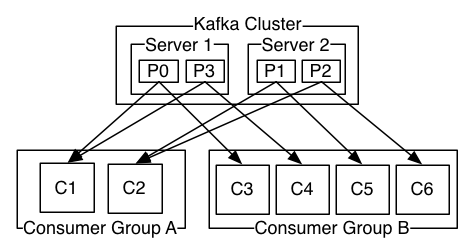
Consumers label themselves with a consumer group name, and each record published to a topic is delivered to one consumer instance within each subscribing consumer group. Consumer instances can be in separate processes or on separate machines.
If all the consumer instances have the same consumer group, then the records will effectively be load balanced over the consumer instances.
If all the consumer instances have different consumer groups, then each record will be broadcast to all the consumer processes.
A two server Kafka cluster hosting four partitions (P0-P3) with two consumer groups. Consumer group A has two consumer instances and group B has four.
More commonly, however, we have found that topics have a small number of consumer groups, one for each "logical subscriber". Each group is composed of many consumer instances for scalability and fault tolerance. This is nothing more than publish-subscribe semantics where the subscriber is a cluster of consumers instead of a single process.
The way consumption is implemented in Kafka is by dividing up the partitions in the log over the consumer instances so that each instance is the exclusive consumer of a "fair share" of partitions at any point in time. This process of maintaining membership in the group is handled by the Kafka protocol dynamically. If new instances join the group they will take over some partitions from other members of the group; if an instance dies, its partitions will be distributed to the remaining instances.
Kafka only provides a total order over records within a partition, not between different partitions in a topic. Per-partition ordering combined with the ability to partition data by key is sufficient for most applications. However, if you require a total order over records this can be achieved with a topic that has only one partition, though this will mean only one consumer process per consumer group.

Guarantees

At a high-level Kafka gives the following guarantees:
  • Messages sent by a producer to a particular topic partition will be appended in the order they are sent. That is, if a record M1 is sent by the same producer as a record M2, and M1 is sent first, then M1 will have a lower offset than M2 and appear earlier in the log.
  • A consumer instance sees records in the order they are stored in the log.
  • For a topic with replication factor N, we will tolerate up to N-1 server failures without losing any records committed to the log.
More details on these guarantees are given in the design section of the documentation.

Kafka as a Messaging System

How does Kafka's notion of streams compare to a traditional enterprise messaging system?
Messaging traditionally has two models: queuing and publish-subscribe. In a queue, a pool of consumers may read from a server and each record goes to one of them; in publish-subscribe the record is broadcast to all consumers. Each of these two models has a strength and a weakness. The strength of queuing is that it allows you to divide up the processing of data over multiple consumer instances, which lets you scale your processing. Unfortunately, queues aren't multi-subscriber—once one process reads the data it's gone. Publish-subscribe allows you broadcast data to multiple processes, but has no way of scaling processing since every message goes to every subscriber.
The consumer group concept in Kafka generalizes these two concepts. As with a queue the consumer group allows you to divide up processing over a collection of processes (the members of the consumer group). As with publish-subscribe, Kafka allows you to broadcast messages to multiple consumer groups.
The advantage of Kafka's model is that every topic has both these properties—it can scale processing and is also multi-subscriber—there is no need to choose one or the other.
Kafka has stronger ordering guarantees than a traditional messaging system, too.
A traditional queue retains records in-order on the server, and if multiple consumers consume from the queue then the server hands out records in the order they are stored. However, although the server hands out records in order, the records are delivered asynchronously to consumers, so they may arrive out of order on different consumers. This effectively means the ordering of the records is lost in the presence of parallel consumption. Messaging systems often work around this by having a notion of "exclusive consumer" that allows only one process to consume from a queue, but of course this means that there is no parallelism in processing.
Kafka does it better. By having a notion of parallelism—the partition—within the topics, Kafka is able to provide both ordering guarantees and load balancing over a pool of consumer processes. This is achieved by assigning the partitions in the topic to the consumers in the consumer group so that each partition is consumed by exactly one consumer in the group. By doing this we ensure that the consumer is the only reader of that partition and consumes the data in order. Since there are many partitions this still balances the load over many consumer instances. Note however that there cannot be more consumer instances in a consumer group than partitions.

Kafka as a Storage System

Any message queue that allows publishing messages decoupled from consuming them is effectively acting as a storage system for the in-flight messages. What is different about Kafka is that it is a very good storage system.
Data written to Kafka is written to disk and replicated for fault-tolerance. Kafka allows producers to wait on acknowledgement so that a write isn't considered complete until it is fully replicated and guaranteed to persist even if the server written to fails.
The disk structures Kafka uses scale well—Kafka will perform the same whether you have 50 KB or 50 TB of persistent data on the server.
As a result of taking storage seriously and allowing the clients to control their read position, you can think of Kafka as a kind of special purpose distributed filesystem dedicated to high-performance, low-latency commit log storage, replication, and propagation.

Kafka for Stream Processing

It isn't enough to just read, write, and store streams of data, the purpose is to enable real-time processing of streams.
In Kafka a stream processor is anything that takes continual streams of data from input topics, performs some processing on this input, and produces continual streams of data to output topics.
For example, a retail application might take in input streams of sales and shipments, and output a stream of reorders and price adjustments computed off this data.
It is possible to do simple processing directly using the producer and consumer APIs. However for more complex transformations Kafka provides a fully integrated Streams API. This allows building applications that do non-trivial processing that compute aggregations off of streams or join streams together.
This facility helps solve the hard problems this type of application faces: handling out-of-order data, reprocessing input as code changes, performing stateful computations, etc.
The streams API builds on the core primitives Kafka provides: it uses the producer and consumer APIs for input, uses Kafka for stateful storage, and uses the same group mechanism for fault tolerance among the stream processor instances.

Putting the Pieces Together

This combination of messaging, storage, and stream processing may seem unusual but it is essential to Kafka's role as a streaming platform.
A distributed file system like HDFS allows storing static files for batch processing. Effectively a system like this allows storing and processing historical data from the past.
A traditional enterprise messaging system allows processing future messages that will arrive after you subscribe. Applications built in this way process future data as it arrives.
Kafka combines both of these capabilities, and the combination is critical both for Kafka usage as a platform for streaming applications as well as for streaming data pipelines.
By combining storage and low-latency subscriptions, streaming applications can treat both past and future data the same way. That is a single application can process historical, stored data but rather than ending when it reaches the last record it can keep processing as future data arrives. This is a generalized notion of stream processing that subsumes batch processing as well as message-driven applications.
Likewise for streaming data pipelines the combination of subscription to real-time events make it possible to use Kafka for very low-latency pipelines; but the ability to store data reliably make it possible to use it for critical data where the delivery of data must be guaranteed or for integration with offline systems that load data only periodically or may go down for extended periods of time for maintenance. The stream processing facilities make it possible to transform data as it arrives.
For more information on the guarantees, apis, and capabilities Kafka provides see the rest of the documentation.

My next blog is about how we use Kafka using python.
Subscribe my blog for further interesting blogs

Friday, 21 April 2017

Flask Python API library

15:24 Posted by SRE Hacks , , , , , , , , , No comments
Eager to get started? This page gives a good introduction to Flask. It assumes you already have Flask installed.

Requirements

If you have a computer that runs Python then you are probably good to go. The tutorial application should run just fine on  Linux. Unless noted, the code presented in these articles has been tested against Python 2.7 and 3.4, though it will likely be okay if you use a newer 3.x release.

You should use pip to install and deploy Flask. To install Flask generally on your system, give this command on the command prompt:
       pip install flask
Note that you can also specify the Flask version, should you need (you won't need this one):
       pip install flask=0.10
This should install Flask and everything it depends on. Don't be surprised if you find it has installed several Python modules as a result.

Flask should now be installed! Now, time to create our first app.

A Minimal Application

A minimal Flask application looks something like this:
from flask import Flask
app = Flask(__name__)

@app.route('/')
def hello_world():
    return 'Hello, World!'
So what did that code do?
  1. First we imported the Flask class. An instance of this class will be our WSGI application.
  2. Next we create an instance of this class. The first argument is the name of the application’s module or package. If you are using a single module (as in this example), you should use __name__ because depending on if it’s started as application or imported as module the name will be different ('__main__' versus the actual import name). This is needed so that Flask knows where to look for templates, static files, and so on. For more information have a look at the Flask documentation.
  3. We then use the route() decorator to tell Flask what URL should trigger our function.
  4. The function is given a name which is also used to generate URLs for that particular function, and returns the message we want to display in the user’s browser.
Just save it as hello.py or something similar. Make sure to not call your application flask.py because this would conflict with Flask itself.
To run the application you can either use the flask command or python’s -m switch with Flask. Before you can do that you need to tell your terminal the application to work with by exporting the FLASK_APP environment variable:
$ export FLASK_APP=hello.py
$ flask run
 * Running on http://127.0.0.1:5000/
If you are on Windows you need to use set instead of export.
Alternatively you can use python -m flask:
$ export FLASK_APP=hello.py
$ python -m flask run
 * Running on http://127.0.0.1:5000/
This launches a very simple builtin server, which is good enough for testing but probably not what you want to use in production.
Now head over to http://127.0.0.1:5000/, and you should see your hello world greeting.
Externally Visible Server
If you run the server you will notice that the server is only accessible from your own computer, not from any other in the network. This is the default because in debugging mode a user of the application can execute arbitrary Python code on your computer.
If you have the debugger disabled or trust the users on your network, you can make the server publicly available simply by adding --host=0.0.0.0 to the command line:
flask run --host=0.0.0.0
This tells your operating system to listen on all public IPs.

What to do if the Server does not Start

In case the python -m flask fails or flask does not exist, there are multiple reasons this might be the case. First of all you need to look at the error message.

Old Version of Flask

Versions of Flask older than 0.11 use to have different ways to start the application. In short, the flask command did not exist, and neither did python -m flask.

Invalid Import Name

The FLASK_APP environment variable is the name of the module to import at flask run. In case that module is incorrectly named you will get an import error upon start (or if debug is enabled when you navigate to the application). It will tell you what it tried to import and why it failed.
The most common reason is a typo or because you did not actually create an app object.

Debug Mode

(Want to just log errors and stack traces? )
The flask script is nice to start a local development server, but you would have to restart it manually after each change to your code. That is not very nice and Flask can do better. If you enable debug support the server will reload itself on code changes, and it will also provide you with a helpful debugger if things go wrong.
To enable debug mode you can export the FLASK_DEBUG environment variable before running the server:
$ export FLASK_DEBUG=1
$ flask run
(On Windows you need to use set instead of export).
This does the following things:
  1. it activates the debugger
  2. it activates the automatic reloader
  3. it enables the debug mode on the Flask application.
Attention
Even though the interactive debugger does not work in forking environments (which makes it nearly impossible to use on production servers), it still allows the execution of arbitrary code. This makes it a major security risk and therefore it must never be used on production machines.

Pandas Python Library

pandas is a Python package providing fast, flexible, and expressive data structures designed to make working with structured (tabular, multidimensional, potentially heterogeneous) and time series data both easy and intuitive. It aims to be the fundamental high-level building block for doing practical, real world data analysis in Python. Additionally, it has the broader goal of becoming the most powerful and flexible open source data analysis / manipulation tool available in any language. It is already well on its way toward this goal.
pandas is well suited for many different kinds of data:
  • Tabular data with heterogeneously-typed columns, as in an SQL table or Excel spreadsheet
  • Ordered and unordered (not necessarily fixed-frequency) time series data.
  • Arbitrary matrix data (homogeneously typed or heterogeneous) with row and column labels
  • Any other form of observational / statistical data sets. The data actually need not be labeled at all to be placed into a pandas data structure
The two primary data structures of pandas, Series (1-dimensional) and DataFrame (2-dimensional), handle the vast majority of typical use cases in finance, statistics, social science, and many areas of engineering. For R users, DataFrame provides everything that R’s data.frame provides and much more. pandas is built on top of NumPy and is intended to integrate well within a scientific computing environment with many other 3rd party libraries.
Here are just a few of the things that pandas does well:

  • Easy handling of missing data (represented as NaN) in floating point as well as non-floating point data
  • Size mutability: columns can be inserted and deleted from DataFrame and higher dimensional objects
  • Automatic and explicit data alignment: objects can be explicitly aligned to a set of labels, or the user can simply ignore the labels and let Series, DataFrame, etc. automatically align the data for you in computations
  • Powerful, flexible group by functionality to perform split-apply-combine operations on data sets, for both aggregating and transforming data
  • Make it easy to convert ragged, differently-indexed data in other Python and NumPy data structures into DataFrame objects
  • Intelligent label-based slicing, fancy indexing, and subsetting of large data sets
  • Intuitive merging and joining data sets
  • Flexible reshaping and pivoting of data sets
  • Hierarchical labeling of axes (possible to have multiple labels per tick)
  • Robust IO tools for loading data from flat files (CSV and delimited), Excel files, databases, and saving / loading data from the ultrafast HDF5 format
  • Time series-specific functionality: date range generation and frequency conversion, moving window statistics, moving window linear regressions, date shifting and lagging, etc.

Data Structures

pandas introduces two new data structures to Python - Series and DataFrame, both of which are built on top of NumPy (this means it's fast).
import pandas as pd
import numpy as np
import matplotlib.pyplot as plt
pd.set_option('max_columns', 50)
%matplotlib inline


DataFrame

A DataFrame is a tablular data structure comprised of rows and columns, akin to a spreadsheet, database table, or R's data.frame object. You can also think of a DataFrame as a group of Series objects that share an index (the column names).
For the rest of the tutorial, we'll be primarily working with DataFrames.

Reading Data

To create a DataFrame out of common Python data structures, we can pass a dictionary of lists to the DataFrame constructor.
Using the columns parameter allows us to tell the constructor how we'd like the columns ordered. By default, the DataFrame constructor will order the columns alphabetically (though this isn't the case when reading from a file - more on that next).
data = {'year': [2010, 2011, 2012, 2011, 2012, 2010, 2011, 2012],
        'team': ['Bears', 'Bears', 'Bears', 'Packers', 'Packers', 'Lions', 'Lions', 'Lions'],
        'wins': [11, 8, 10, 15, 11, 6, 10, 4],
        'losses': [5, 8, 6, 1, 5, 10, 6, 12]}
football = pd.DataFrame(data, columns=['year', 'team', 'wins', 'losses'])
football
year team wins losses
0 2010 Bears 11 5
1 2011 Bears 8 8
2 2012 Bears 10 6
3 2011 Packers 15 1
4 2012 Packers 11 5
5 2010 Lions 6 10
6 2011 Lions 10 6
7 2012 Lions 4 12

Much more often, you'll have a dataset you want to read into a DataFrame. Let's go through several common ways of doing so.